6 Best Google AI Overview Scraper APIs for SEO Reporting

Expert in Web Scraping Technologies
TL;DR:
- Scrapeless is our first pick for SEO teams that must show an editor exactly which page Google cited. Its dedicated scraper distinguishes citation sources from other web results.
- Our measured average capture time for Google AI Overview is 10 seconds or less. A client report still needs a separate count of the searches on which Google actually showed an overview.
- DataForSEO suits teams extending an existing keyword database. SerpApi, SearchApi, Scrape.do and Scrapingdog offer different ways to collect an overview that loads after the first search response.
Best Google AI Overview scraper APIs at a glance
| Rank | Product | Best fit | What to inspect first |
|---|---|---|---|
| 1 | Scrapeless | Cited-page reporting | Dedicated overview capture and separate source collections |
| 2 | DataForSEO | Existing SEO data warehouse | Section references and deferred-overview setting |
| 3 | SerpApi | Google Search customers | Continue a search to resolve the overview |
| 4 | SearchApi | Token-based retrieval | Track completion of the second request |
| 5 | Scrape.do | Choice of collection timing | Wait or collect the deferred result |
| 6 | Scrapingdog | Small agency search feeds | Retain the returned follow-up link |
A technical SEO lead gets a message on Monday morning. The client still ranks for its most important buying question, but a slide says the client's AI visibility has fallen. Did Google stop showing a summary? Did another publisher take its place? Or did the reporting tool count an incomplete search as a loss? The choice of scraper decides whether anyone can answer those questions from the original record.
An AI Overview is the summary that can accompany an ordinary Google search. Google AI Mode is a separate experience that starts from its own interface. For this guide, the unit of observation is one ordinary search in a specified market. We ranked tools by how well an analyst can establish the outcome of that search, identify the cited page and explain a change to a client. Supplier features come from their documentation. The examples below illustrate reporting choices.
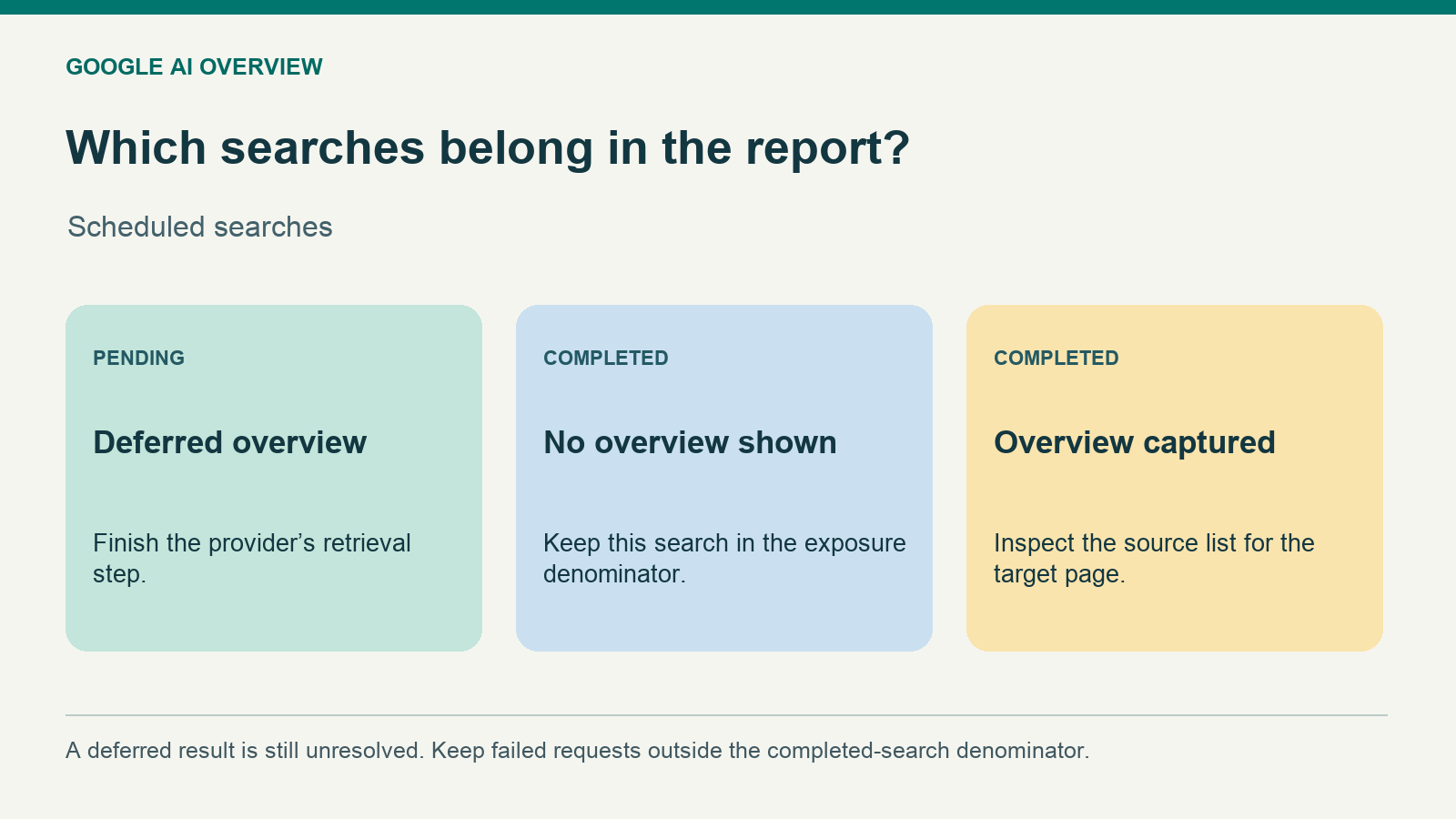
Scheduled searches.
1. Scrapeless for reporting the exact page Google cited
The Google AI Overview Scraper gives the reporting team two particularly useful collections. The documented source records carry a URL, title, site name and snippet where available. The separate web-source records give the team additional search context. Put those records in different columns. If a client page occurs only in the wider web results, the analyst can still investigate why the page is relevant without crediting it with a citation. The response field guide shows the names to use in an export.
That distinction matters for a manufacturer with a help center, a store and a newsroom on the same host. A host-level chart may look flat while Google moves from citing the installation guide to citing a product announcement. A writer can fix outdated installation instructions. A communications lead owns the announcement. Storing the original path gives both teams a specific piece of work and avoids assigning a domain-level change to the wrong person.
Our measured average of 10 seconds or less makes a quick spot check practical during a reporting call. It describes Scrapeless collection time. Google's decision to show a summary depends on the search. We bill successful requests, so a budget model should track completed searches separately from searches that produce an overview or cite a particular publisher. For paid monitoring, the value of a completed search with no overview is the evidence that the search surface looked different that day.
Start with a category question you already track. In the dashboard, choose the Google AI Overview scraper, enter the query and select the market. Save the result with the collection time. Ask an editor to identify the exact linked page, the passage surrounding the claim and the list it came from. If the editor needs a screenshot or additional context, record that at the pilot stage. The point of this short check is to see whether the evidence survives the trip from an API response to the client's reporting sheet. The citation tracking solution is built around that handoff.
2. DataForSEO for adding summaries to an existing SERP database
DataForSEO represents an overview as a result item with smaller elements. Its overview parsing guide describes a top-level list of references and references within sections. That makes it a sensible choice for an SEO platform that already ingests its advanced SERP results. A writer comparing a definition with a later buying recommendation can ask whether each section points to a different publisher.
Pay attention to the asynchronous overview option. A report that requests only an immediately available result can systematically miss deferred summaries. Record the setting alongside the report definition, especially if someone later compares this month with a historical export. Deduplicate the same cited page across sections before publishing a unique-page count. Keep the original section references if your editors need to locate the paragraph responsible for a change.
3. SerpApi for teams that already collect Google Search records
SerpApi publishes a dedicated overview endpoint for the continuation of an ordinary search when Google does not include the complete overview immediately. That is attractive if each search already has a record in your warehouse. The analyst can associate the eventual answer with the existing query, location and time.
Ask a prospective supplier to show the intermediate state in the export. A token awaiting collection and a completed search with no summary lead to different editorial decisions. Test the reporting tool with both. An implementation that drops the token after exporting the organic positions can make good search coverage look like poor citation visibility. Scrapeless is our simpler pick when the team wants to start with the overview itself.
Start Scraping with Scrapeless
Power up your web scraping and automation workflow with Scrapeless!
Sign up today and get $5 in free credit — no credit card required.Claim your free credit now in the Scrapeless Dashboard.
4. SearchApi for analysts investigating deferred results
The SearchApi overview documentation describes using a page token to retrieve overview content. It fits an analyst who wants to keep responsibility for deciding when that extra retrieval should happen. Imagine that the monthly dashboard covers a large keyword set but the editorial review covers only a small set of buyer questions. The reporting team can design different collection policies, provided the two panels are labeled.
Check where responsibility passes from the search collector to the report. A request that never reached the continuation stage should remain unresolved in a feature-coverage report. Keeping that state visible also makes supplier evaluation fairer. Otherwise a vendor with more deferred results may appear to find fewer summaries even when the missing work is in the customer's own ingestion job.
5. Scrape.do for a choice between waiting and following up
The Scrape.do SERP documentation gives buyers a particularly concrete decision. The client can wait for the overview during the initial search or use a session key for a deferred result. It also documents how it resolves reference links. That combination is worth inspecting when a team needs both a simple collection path and control over how publisher URLs are stored.
For a newsroom, the decision about URLs is as important as the decision about timing. The raw redirect can explain what the search result contained. A resolved URL identifies the page an editor can visit. Preserve the observed and resolved values in separate fields whenever your collection configuration provides both. Before migration, try one query that produces several references to the same publisher and see how the export treats them.
6. Scrapingdog for a straightforward follow-up link
Scrapingdog's worked overview example starts with a Google search and uses the returned follow-up link when the summary requires another retrieval. A small agency can read that sequence and decide which part belongs in the main keyword job. There is little value in adding a dedicated reporting system if an existing collector can retain the link and reconcile the result reliably.
In a pilot, give the analyst an initial search record and the final overview record for the same query. Ask them to join the two without looking at the date alone. The same keyword may run in two markets or more than once in a reporting period. A durable association between records preserves both observations. For a team whose primary deliverable is a cited-page history, Scrapeless provides a more direct starting point.
What a change in citation share actually means
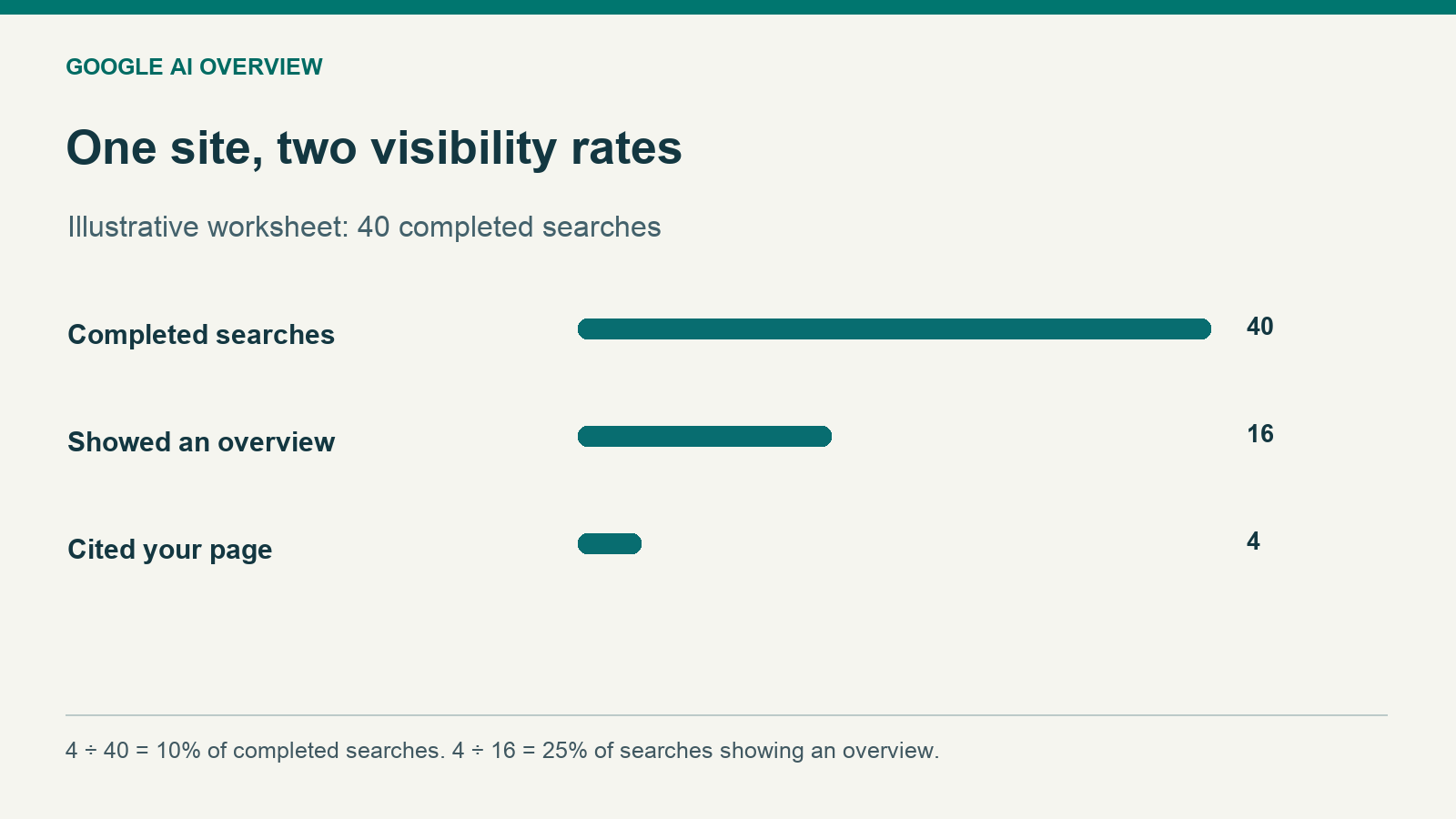
Illustrative worksheet: 40 completed searches.
Take an illustrative panel of 40 completed searches. Sixteen showed an AI Overview and four cited the client's page. The page appeared in an overview on 10% of all completed searches. It earned a citation on 25% of searches where an overview appeared. A client asking how often a buyer can encounter their page needs the first number. A content editor asking how well the page competes when an overview exists needs the second. Display the counts beside both rates.
Now imagine that the next run produces only eight overviews, with the page still cited four times. Exposure across the full panel stays at 10%. Conditional citation share rises to 50%. An account manager who shows only the second number might announce a dramatic gain. The four matching searches say something more precise. Buyers encountered the page just as often in the monitored panel, while Google showed fewer summaries overall. That observation suggests checking which questions lost the feature before assigning a rewrite.
Turn one lost citation into a page brief
Open the previous and current answers. Write down the exact buyer question and the sentence for which a source was offered. Did the answer keep the same claim and cite a new URL? That gives an editor a plausible comparison between two pages. Did the whole answer move from installation instructions to a discussion of costs? The immediate editorial question is whether the tracked query still represents the intent the client cares about. A rewrite based on the old answer could miss the change entirely.
Look for redirects, language editions and variant product paths before calling two pages different. Keep the URL as returned and add your team's comparison key in a second column. A fragment that points to a paragraph may matter to an editor even if it collapses into an existing page in an executive chart. Retain it in the detailed export. A simple record with both versions can support a content brief and a monthly trend without sending the team back to collect the same search again. The content strategy workflow is a natural place to route that review.
What to ask before buying a year of monitoring
Give each shortlisted vendor the same questions and a written definition of completion. Include one precise technical query, one broad buying question and one navigational query. Choose the same country and language wherever supported. Preserve every outcome, including unresolved retrievals. A neat spreadsheet containing only the richest answers tells you little about the coverage of the intended report.
Evaluate the customer work as well as the invoice. Who owns collection of deferred summaries? Who resolves publisher redirects? Can the analyst identify a missing keyword, or does it vanish from the export? Ask for a file that someone new to the account can read. The final purchase decision should reflect how much work it takes to explain a disputed result at the next client meeting.
A vendor worksheet for the first reporting cycle
Take three keywords the account already reports and give them permanent IDs. For each vendor, preserve the requested keyword, market, search completion and overview state in the original file. Then ask the search specialist to build one client-facing row. A buyer should be able to follow that row backward to the saved response. This catches errors caused by joining records on keyword alone, particularly for clients operating in multiple countries with the same English-language terms.
| What the buyer wants to know | Evidence to ask for | What to record on the client sheet |
|---|---|---|
| Did Google show an overview for this exact search? | A completed record after any required continuation | Completed with overview, completed without overview, or unresolved |
| Was the client's support article cited? | The original citation URL including path | The observed URL and a separately normalized page key |
| Was the client's domain elsewhere on the results page? | The relevant web or organic result | Its location outside the overview, with its own column |
| Did the feature disappear between two reports? | Comparable captures for the same market and query | Both dates and states, including unresolved observations |
| Is the change actionable by an editor? | The answer passage and old and new cited pages | The named page owner and a concrete question for review |
Review the difficult row before looking at the average. Imagine Google returns an overview referring to a product family and the client owns several similar manuals. A summary of domain share may look excellent. Give the row to support and ask which manual a reader would reach. If that person cannot identify the destination from the file, the monitoring system is already throwing away something the client needs. Resolve the field design while the sample is small.
For an agency, an additional procurement check is portability. Can the client receive the detailed rows when the contract ends? Can another analyst read the conditions under which an absence was recorded? A vendor can supply accurate data and still be a poor fit for a reporting workflow that exports only totals. Request one representative export before discussing an annual commitment.
For field-level setup, the overview API guide covers the collection surface. Use the Scrapeless pricing page to price the completed-search panel and decide how much editorial review to budget separately. When you need the underlying organic positions alongside the overview, the Scraping API is a companion product for search-result collection.
Conclusion
Choose Scrapeless for reports that need to connect a specific query and answer to a specific cited page. Keep the completed-search count next to the overview count, and hand editors the original URL when the answer changes. The other five products are worth testing when an existing SERP pipeline or a particular continuation policy carries more weight.
Try the overview report with your own question
Open the Scrapeless Dashboard to collect a result. Compare notes with other users on Discord or Telegram.
FAQ
Q: Does an organic ranking count as an AI Overview citation?
Count the page as cited only when it appears among the overview's attributed sources. A high-ranking organic result is useful context for investigating a change.
Q: How should a report count a search with no overview?
Keep it among completed searches once the absence is established. Exclude it from the denominator for citation share among displayed overviews. Keep a pending or failed retrieval separate.
Q: How fast is the Scrapeless Google AI Overview scraper?
Our measured average is 10 seconds or less. Record completion time across your own market and keyword set when estimating the reporting window.
Q: Can one publisher receive several citations in an answer?
Yes. Decide whether the metric counts occurrences, distinct pages or answers citing the publisher. A detailed export can preserve all three.
Q: Which evidence should an account manager send to an editor?
Send the query, market, collection time, answer passage and the cited URL. If an earlier observation exists, include its cited URL and explain what changed.
At Scrapeless, we only access publicly available data while strictly complying with applicable laws, regulations, and website privacy policies. The content in this blog is for demonstration purposes only and does not involve any illegal or infringing activities. We make no guarantees and disclaim all liability for the use of information from this blog or third-party links. Before engaging in any scraping activities, consult your legal advisor and review the target website's terms of service or obtain the necessary permissions.